TL;DR

Get garden gear delivered free with Prime
- Fast, free delivery on millions of items
- Prime Video, Amazon Music and more included
- Member-only deals all year
Building an AI workstation used to be cheaper, but rising component costs and bulk-buy discounts make prebuilt systems competitive now. Your choice depends on your budget, time, and technical skills, with recent developments tilting the scale.
Ever wondered if you should build your own AI powerhouse or just buy one ready-made? The game has changed. In 2026, the old rule — build cheaper, buy faster — no longer holds true. Rising component prices and supply chain issues have leveled the playing field. Whether you’re a hobbyist, researcher, or startup founder, understanding what each route offers can save you time, money, and frustration.
This guide walks you through the latest in hardware trends, costs, and what really happens behind the scenes when you pull those levers — from thermal tuning to warranty coverage. By the end, you’ll know which path fits your needs best, with concrete examples and practical tips.
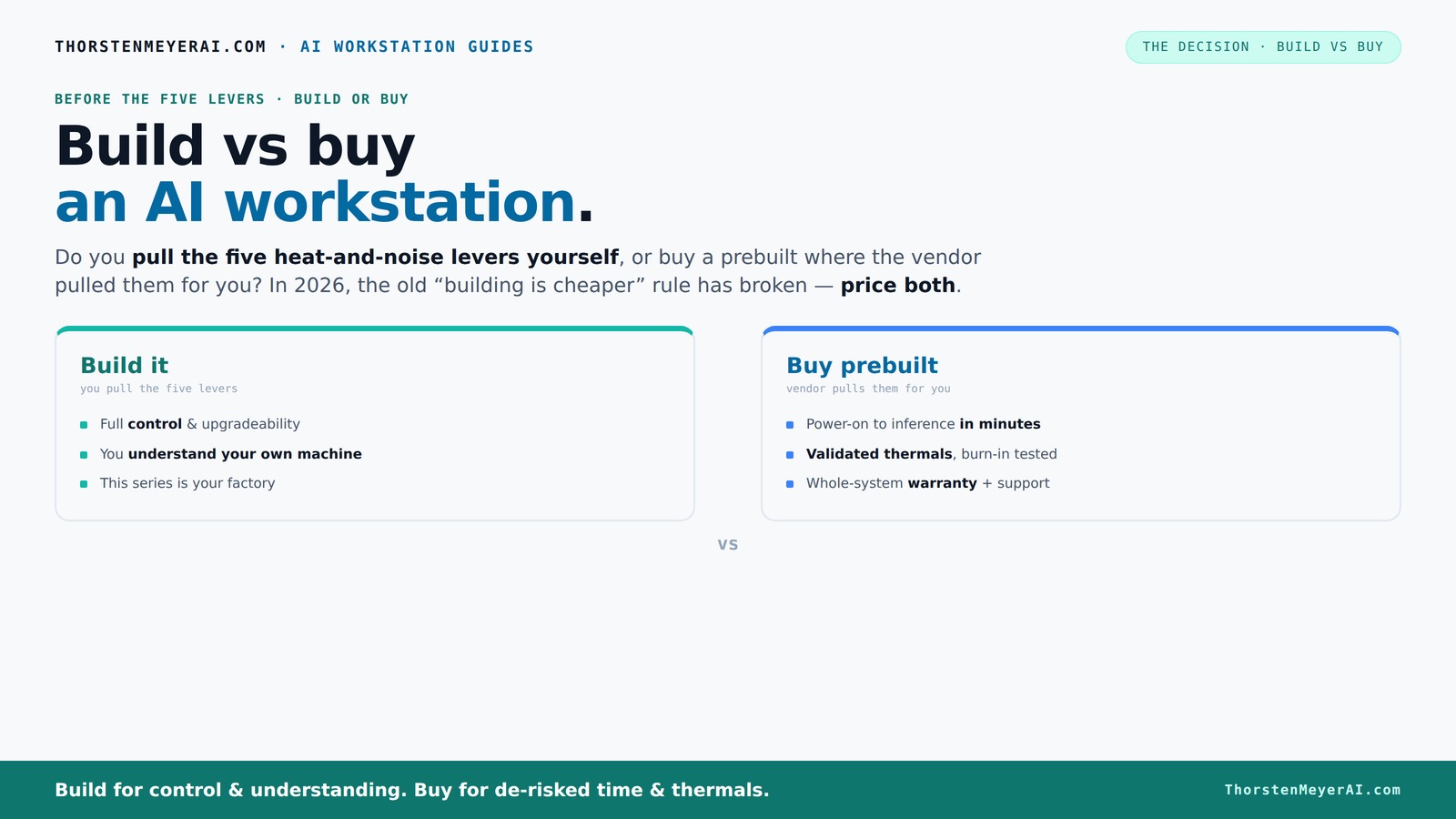
Build vs buy
an AI workstation.
The real question behind this whole series: do you pull the five heat-and-noise levers yourself, or buy a prebuilt where the vendor pulled them for you? And in 2026, the old “building is cheaper” rule has broken. Match your situation in Part 3.
Key Takeaways
- In 2026, prebuilt AI workstations often match or beat DIY costs due to bulk discounts and component shortages.
- Building offers maximum customization and upgrade flexibility but requires time, knowledge, and patience.
- Prebuilts provide validated thermals, warranties, and support—ideal for those who want hassle-free setup and peace of mind.
- Component choices and future-proofing differ significantly; plan your upgrades early whether building or buying.
- Always price both options based on your specific needs today—don’t assume one is cheaper without checking.
As an affiliate, we earn on qualifying purchases.
Why Building Your Own AI Workstation Might Cost More Than You Think
Building your own AI rig isn’t just about choosing parts anymore. In 2026, component shortages and inflation have made DIY more expensive than it looks. For example, a high-end GPU like the NVIDIA RTX 4090 used to cost around $1,500, but now it’s often sold for over $2,000.
Plus, you need quality cooling, a power supply, and a motherboard that can handle the heat and power draw. All these add up fast. A DIY build that used to come in under $3,000 might now hit $4,000 or more, depending on your choices.
But it's not just about parts. You spend time researching compatibility, troubleshooting driver issues, and tuning thermal settings. The process eats into your schedule, especially if you’re new to hardware tinkering.
As an affiliate, we earn on qualifying purchases.
How Prebuilt AI Workstations Are Competing on Price in 2026
Prebuilt systems are no longer just about convenience. Thanks to bulk buying and supply chain efficiencies, vendors now offer AI workstations at prices that can rival or beat DIY builds. For instance, a preconfigured system with a Tesla T4 GPU and 128GB RAM might cost around $4,500, including professional thermal tuning and a warranty.
Companies like Lambda or Puget Systems validate their systems with extensive burn-in tests, ensuring they won’t throttle under heavy AI workloads. They also include support plans—something rare in DIY setups. Some vendors even offer water-cooling or custom noise reduction, all factory-validated.
This means you can get a plug-and-play powerhouse without sacrificing thermal performance or risking build errors. The tradeoff? You pay a premium for peace of mind and support.
As an affiliate, we earn on qualifying purchases.
Performance and Customization: Build vs Buy in 2026
| Build | Buy |
|---|---|
| Full control over parts—GPU, CPU, RAM, storage. | Pre-selected configurations designed for general AI tasks. |
| Can optimize for specific workloads, e.g., faster inference or longer training. | Less room for customization, but proven stability. |
| Upgrade over time with new components. | Limited upgrade paths, often restricted to RAM or drives. |
Building means tailoring your rig. Want a quieter cooling system? Pick a case with sound-dampening panels. Need a specific GPU? Choose carefully. Prebuilts come with tested configurations, optimized for stability but less flexible.
As an affiliate, we earn on qualifying purchases.
Time, Effort, and Risk: What's Really at Stake?
If you have the time and enjoy the process, building your own machine can be rewarding. It’s like assembling a puzzle—every piece fits your exact needs. But it takes patience, research, and troubleshooting. A misstep could lead to compatibility issues or thermal throttling.
Prebuilt systems remove the hassle. They arrive ready to run, tested for thermal performance, with support lines open if something goes wrong. Learn more about building vs buying. For busy professionals, this can save days or even weeks.
Consider your risk appetite. Do you want to tinker or prefer a proven, supported solution? Your answer shapes whether building or buying makes sense.
Upgradability and Long-Term Planning: Which Route Wins?
Building your own system often means easier upgrades. Swapping out a GPU or adding RAM is straightforward if you plan ahead. For more on this, see building your own AI system. For example, choosing a motherboard with PCIe 5.0 slots lets you upgrade to future GPUs without a full rebuild.
Prebuilt workstations vary. Some are locked down and limited in expansion. Others offer optional upgrades, but they might come at a premium and require professional installation.
If you anticipate future needs, building might give you more control. But if you want a system that’s ready for years of heavy AI work with minimal fuss, a high-quality prebuilt could serve you better.
Which Is Better for Your Budget and Goals?
Ask yourself: Do you want the cheapest possible machine, or the most reliable and hassle-free one? Find out more at Mother's Day quotes and messages. Building can save money if you already own parts or catch sales, but in 2026, prebuilt prices are often competitive due to bulk discounts.
If your goal is to start AI training fast, prebuilt is the clear winner. If you love hardware tinkering and want a machine tailored perfectly, building is satisfying—and often cheaper, if you’re patient.
Remember, the right choice depends on how you value time, effort, and reliability.
Frequently Asked Questions
Is building my own AI workstation cheaper than buying one?
Not always. Rising component costs and shortages have made DIY builds more expensive in 2026. Sometimes, prebuilt systems with bulk discounts match or beat DIY prices, especially when factoring in time and support costs.
How hard is it to assemble a high-end AI workstation myself?
If you're comfortable with hardware, it’s manageable but time-consuming. You need to research compatibility, install drivers, and tune thermal settings. Beginners might find it challenging and risk errors, but plenty of tutorials can help.
What should I look for in a prebuilt AI workstation?
Focus on validated thermals, warranty coverage, and support options. Ensure it has the GPU and CPU power for your workload, and consider future upgrade paths. Vendors like Lambda and Puget Systems are known for quality preconfigured AI rigs.
Can I upgrade a prebuilt system later?
It depends. Some systems are designed for easy upgrades—adding RAM or swapping GPUs—while others are more restrictive. Check with the vendor about upgrade options before buying.
Which option is better for small startups or individual researchers?
If you value quick setup and minimal hassle, a prebuilt system offers reliability and support. If you love tinkering or want to stretch your budget, building can be more rewarding and cost-effective—if you have the time and skills.
Conclusion
The choice between build and buy hinges on your priorities—cost, effort, and peace of mind. In 2026, the gap has narrowed, making your decision more about what you value most: a tailored machine or a ready-to-go powerhouse.
Remember, a well-chosen system can run AI workloads smoothly for years—so pick what aligns best with your workflow and confidence. In the end, whether you build or buy, your next AI breakthrough depends more on your ideas than your hardware.
Halloween Picks
halloween
As an affiliate, we earn on qualifying purchases.